I was so excited when I saw that Math-U-See now offers Accelerated Individualized Mastery (AIM) for Addition and Subtraction, I knew that I wanted us to try it. This program was developed for students that are older who are struggling with math because they have gaps in their math foundations (specifically with addition and subtraction facts). For those not familiar with Math-U-See, their program teaches using multi-sensory tools - videos, manipulatives, and other resources that appeal to all types of learners. Through this process of "seeing" math, you begin to really understand it.

Our AIM Box

Inside our box
This particular program has a physical set and a digital component. They physical set includes an AIM resource guide, Math-U-See Integer blocks, Math-U-See colored pencils, Fact Check Cards and Math Fact Strategy Posters.

Our Fact Check Cards

Our cards after separating them.
{The stars are used to measure mastery. When facts are known the stars are colored in.}
{The stars are used to measure mastery. When facts are known the stars are colored in.}

I love the different colors of our Integer blocks, each number of blocks is a different color. The individual ones are green, the blocks with two are orange, the blocks with three are pink, etc.
 The colored pencils are the exact same colors as the Integer blocks.
 A peek inside our AIM Resource Guide
 The Build, Write, Say method is a huge part of this program to help students learn mastery of their addition and subtraction facts.


Our guide is awesome. Not only does it explain the AIM approach, but it also contains step-by-step instructions for each lesson, strategies for assessing mastery, guidance on the next steps along with sample activities for practice and review. I also really appreciate the lessons at a glance pages.


Our Online Component
The digital component gives us 12 months of access to the online and downloadable resources that are available to support the AIM program. I like that the online component has both overview and lesson-specific videos and instructions along with solutions with additional practice resources! You can print extra consumables in the resource section.

There is a Before AIM Assessment to determine if AIM is right for your child.
 E's score is in red. D's is in purple and F's is in orange.

I completed this assessment with several of the kids. It has written instructions and a short video so that you know that you are administering it correctly. D and E both scored a 117 (kind of funny they would get the same number), which means they have a solid foundation for addition and subtraction. F scored a 47, which meant the AIM for Addition and Subtraction program will benefit him in his math fact fluency so I'm using it with him!

Above you can see the first online lesson on Integer Blocks. You can see when you are watching the first lesson there are 4 blue boxes underneath: Lesson box, Activities box, Resources box and Assessments box.
 F watching Lesson 1
 When you click the Activities box you then have several options open: Color Key, Integer Block Matching Game, Integer Blocks (Colors and Values) and Color-by-Block Value Activity.
 Above you can see the color key of the pencils matched with their Integer Blocks.
 In Lesson 3, there is also a Solutions tab for the problems.
 Above is an example of what you see in the solutions tab for the word problems in Lesson 3.
 The Resources tab in Lesson 3 contains Online Drill, Worksheet Generator, Digital Manipulatives, Addition Facts Mastery Chart and Subtraction Facts Mastery Chart.
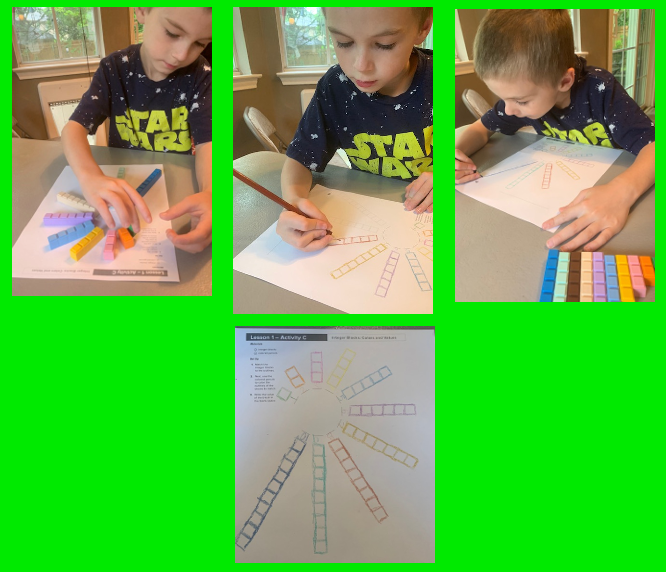
 F working on Lesson 1 Activity C
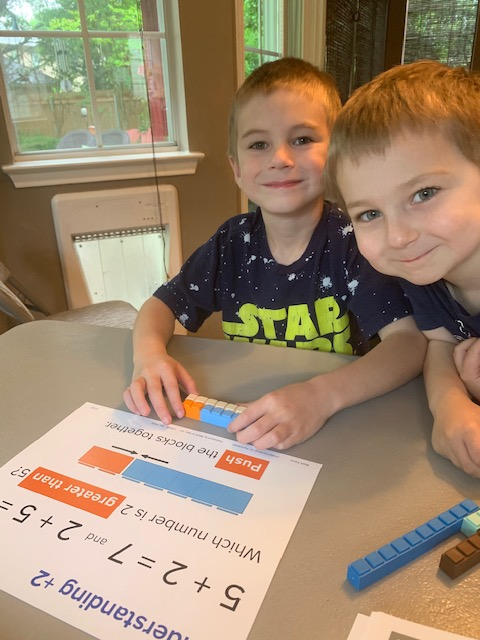
 F building with our Integer blocks.
 G likes to watch!



While this program is geared for students a bit older (8-16) who haven't
mastered addition
and subtractions facts, use their fingers for counting, and/or begin
struggling as math concepts increase in difficult, it's going well
using it with F and I am pleased. Again, AIM for Addition
and Subtraction specifically focuses on mastery of single-digit
addition and subtraction. This program can be completed at the
student's pace, usually 6-8 weeks, but again, the student can and should set the
pace as you move on as mastery is acquired. We are using it at a slightly slower pace since F is a bit
younger. If you have a student struggling with basic addition and subtraction facts, AIM is a great program to use to help them strengthen and master these math concepts.

How we store our set.
All the planning and lesson preparation leg work for this program is
done for you. Just follow the guide and online lessons and watch your
student learn!
Be sure to click on the banner below to visit the Homeschool Review Crew blog to read even more reviews of Math-U-See.

You can engage with Math-U-See on social media @: